[This is from a digital handout I give to all of my teachers.]
Visual Impairments Specialist: Ms. Kathy
Below are some links to ideas and activities that I have consulted with some of you about. If not—well here they are! Remember that the Classroom Suites activities cannot be open unless you have the program installed on the computer you’re opening them on. Don’t forget to save them before closing if you want to keep them. If you accidentally delete a CRS activity that you’d like to keep you can find them on the Activity Exchange if you have a free account there. Look for my user name: mskathy0724
I’ve put asterisks (*) next to my special activities for students with multiple disabilities.
___________________________________________________________________
20 iPad Aps for Kids with Autism*
It’s a list of what it says.
_______________________________________________________________________
ABCYA.com
“ABCya.com is the leader in free educational kids computer games and activities for elementary students to learn on the web. All children's educational computer activities were created or approved by certified school teachers. All educational games are free and are modeled from primary grade lessons and enhanced to provide an interactive way for children to learn…”
_______________________________________________________________________
ABC’s of Digital Tools in the Early Childhood Classroom*
It’s a list of what it says
____________________________________________________________________
Animoto
Good videos can be created for classes with photos and graphics found on the internet. However one cannot add one’s own audio except for music , for creating descriptive videos for children who cannot see the graphics.
__________________________________________________________________
Braille Notebook cards*
A teacher does not need to know Braille to use these cards. These are used when you are going over the alphabet every day with the entire class and the blind child in your class cannot see or feel the letters you point o on your chart. Have the paraprofessional open these notebook cards for the child to follow along with her sighted peers.
________________________________________________________________
Catalog of iPad Aps for Teachers and Students*
It’s…you know.
_________________________________________________________________
Children Around the World (Mexico)*
Created By: Cindy Kerr
Skill Level: Grades K-2
Curriculum: Language Arts Life Skills Social Studies
Activity Details: Join us this year as we visit children in countries around the world to see what their schools look like, clothing, music, food and language. We'll see the map, flag and capital cities.
Easy next page button and yes-no self checking questions.
___________________________________________________________________
Edmodo
“Edmodo provides a safe and easy way for your class to connect and collaborate, share content, and access homework, grades and school notices.” (There is also a mobile access version)
Educational Needs for Low Vision*
A few ideas for children with low vision
___________________________________________________________________
E-Reader’s Worksheet1 *
E-Reader Worksheet 2*
Use these as a template to create an online worksheet for your students. Do you know how to create hyperlinks like the ones in this document?
_________________________________________________________________
Five Little Monkeys*
Intellitools activity: Created By: Cindy Kerr
Skill Level: Birth-5
Curriculum: Language Arts Math
Accessibility Features: Switch Low Vision
Activity Details: Easy numbers 0 to 5 with music from the well known song. Find the answer to turn the page.
Scanning set.
Attached overlay.
Music purchased from iTunes is "Five Little Monkeys" by The Countdown Kids.
_______________________________________________________________________
Fun Brain*
Learning games in all content areas with a section for teachers and parents.
________________________________________________________________________
Greenville ES Word of the Day
Created By: mskathy0724
Skill Level: Grades 3-5
Curriculum: Language Arts
Accessibility Features: Low Vision
Activity Details: Some of these words may seem above 2nd & 3rd grade level but you may be surprised! My visually impaired students like to try "footlong" words. Sometimes they'd bring them to class. Then we'd get the definiton and they'd braille/write their own sentences for them in their morning journals. Some of the sentences they authored are included in this activity. I'd make a card with the word, part of speech, definition in print embossed with braille and they'd tape it to our door until the door was filled with "footlong" words. For a fun test, I'd let the Intellitools program read to them and they'd braille their answers on paper. Then we'd check answers from their papers to the program.
_______________________________________________________________________
Internet4Classrooms
Free Internet resources to use in classroom instruction, developing project ideas, reinforcing specific subject matter areas both in the class and at home and even for online technology tutorials. The portal is used by teachers, parents and students of all ages on six of the seven continents (there are not many classrooms in Antarctica) and is available to anyone with an Internet connection.
__________________________________________________________________________
KERPOOF!
Great for encouraging creative writing! The Kerpoof website is owned and operated by the Walt Disney Company… Kerpoof is all about having fun, discovering things, and being creative. Here are just a few ways that you can use Kerpoof:
• Make artwork (even if you aren't good at drawing!)
• Make an animated movie (really! it's easy!)
• Earn Koins which you can trade for fun things in the Kerpoof Store
• Make a printed card, t-shirt, or mug
• Tell a story
• Make a drawing
• Vote on the movies, stories, and drawings that other people have made
_________________________________________________________________
Lily: The Blind Great Dane
Intellitools Classroom Suites Activity: Created By: Byron O Wilkes
Skill Level: Grades 3-5
Curriculum: Language Arts
Accessibility Features: Switch AAC
Activity Details: This activity set is made up of two activities. The first is a reading activity for students which relates the story of Lily, a blind Great Dane and her friend Maddison. Note: students can also listen to the story if they can't read yet. The second activity is a comprehension activity which provides a set of seven questions in a 3-2-1 format to evaluate the student's comprehension or understanding of the story. Note: the activity captures all of the student's responses and a report can be generated through the IntelliTools Classroom Suite Reporting System if the activity is assigned to the student. Please note that the template used for the reading activity is from the Learning Magic, Inc. "Writing Bin-Early Skills" CD and the template used in the comprehension activity is from the Learning Magic, Inc. "3-2-1 For IntelliTools Classroom Suite" CD. Please do not use these templates to create other activities unless you own a copy of the aforementioned CDs. For further information on those products please visit our website at www.learningmagicinc.com.
________________________________________________________________________
LDOE Coursewhere
Create an account here and apply for workshops sponsored by the LDOE this summer.
_____________________________________________________________
Matt’s Wallet*
Intellitools CRS Activity: Created By: mskathy0724
Skill Level: Grades 3-5
Curriculum: Math Life Skills
Accessibility Features: Low Vision
Activity Details: My high school student Matthew wants to count money because someday he wants to be rich. He helped with this activity. It helps to teach how many of each coin will equal a dollar and how many of each bill denomination are in $100. Matt picked out the items to purchase at the end of the activity. Since the items chosen stay on the activity, a teacher can check for correct answers by going back into the program to see the number of coins and bills the student clicked to add to the pictures.
May In My Classroom
An Intellitools activity brought to you by the same therapist who created “April in My Classroom.”
Microsoft Narrator*
If you have a relatively new computer, one of the accessibility features is a screen reader called Microsoft narrator. The link will take you to the web site that will show you how to locate and use it.
MOODLE
“Moodle is a Course Management System (CMS), also known as a Learning Management System (LMS) or a Virtual Learning Environment (VLE). It is a Free web application that educators can use to create effective online learning sites.“
_________________________________________________________________
Ms. Kathy’s Kids Blog
Just my blog where I post ideas, photos of ideas, articles and the occasional rant/vent.
______________________________________________________________________
My Big Campus
“My Big Campus extends the classroom to a safe, engaging online environment.”
__________________________________________________________________
One True Media*
Free but it’s worth it to purchase a premium account. Create videos with music and sound. Voice videos can be added (I’ve used clip from my Flip Cam) so that visually impaired children can appreciate the videos as well. You can email links to parents or order a DVD of your finished product for about $10.
__________________________________________________________________
Raz Kids!
An online leveled books library for grades K-6. Students improve their reading skills by:
• Listening for modeled fluency
• Reading for practice
• Recording their reading
• Checking comprehension with quizzes
Students log in to get books and quizzes assigned by their teachers.
_______________________________________________________________
Research Paper Sites (High School/Middle School)
It’s that time of year! This list of sites can help. I’ve had them for a while so let me know if some of the links are no longer valid
______________________________________________________________
Scoop It!
Instructional Resources for Technology on all levels. You can search for lesson plans and curricula using the drop-down menus, or visit the Educator pages for any of the products
________________________________________________________________
Study Guide Template
This one was made for a VI resource class but you can use it as a template for HS/MS Study guides and drop them in your students’ computer folders
_________________________________________________________________
Technology for the Visually Impaired
A blog about the latest stuff and updates on stuff we already use. Yum!
_______________________________________________________________
Typical Technology Solutions for the Disabled
You know.

Showing posts with label adaptations for the blind. Show all posts
Showing posts with label adaptations for the blind. Show all posts
Monday, May 21, 2012


Friday, May 11, 2012
Bookshare Contest
Each year, our Summer Reading Contest encourages students to read for pleasure while out of school. Just by preparing your students for this year's summer reading contest, you can take part in a contest of your own and earn a chance to win one of several great prizes!
To participate in the Summer Contest, a student must have an Individual Membership in Bookshare. For every student in your school or district who has one by May 31st, 2012, your organization will receive one entry in our educator contest. The more students for whom you get Individual Memberships (learn how here or here), the more chances your organization will have to win!
HERE ARE THE PRIZES:
• Grand Prize: an iPad 2 (one only, a $399.99 value)
• First Prize: MP3 players (three total, one per organization, a $29.99 value)
• Second Prize: A free license to Read2Go (five total, one per organization, a $19.99 value)
• Third Prize: A $20 Staples gift card (five total, one per organization)
• Fourth Prize: A USB drive (five total, one per organization, a $12.99 value)
BENEFITS OF INDIVIDUAL MEMBERSHIPS:
Besides enabling students to participate in the Summer Reading Contest, Individual Memberships:
• Enable students or parents to download books anywhere, anytime (and all summer long)!
• Allow students or parents to install Bookshare's free reading tools on any computer.
• Promote independence as students learn they can download books themselves.
• Encourage students to read for pleasure, not just for school.
• Make it easier for students to utilize our mobile apps: Read2Go for iOS devices, and Go Read for Android devices
Help your students, and you just might win a prize. Best of luck! Please let us know if you have any questions or concerns.
Sincerely,
The Bookshare Team
Benetech
480 California Ave., Suite 201
Palo Alto, California 94306
US
To participate in the Summer Contest, a student must have an Individual Membership in Bookshare. For every student in your school or district who has one by May 31st, 2012, your organization will receive one entry in our educator contest. The more students for whom you get Individual Memberships (learn how here or here), the more chances your organization will have to win!
HERE ARE THE PRIZES:
• Grand Prize: an iPad 2 (one only, a $399.99 value)
• First Prize: MP3 players (three total, one per organization, a $29.99 value)
• Second Prize: A free license to Read2Go (five total, one per organization, a $19.99 value)
• Third Prize: A $20 Staples gift card (five total, one per organization)
• Fourth Prize: A USB drive (five total, one per organization, a $12.99 value)
BENEFITS OF INDIVIDUAL MEMBERSHIPS:
Besides enabling students to participate in the Summer Reading Contest, Individual Memberships:
• Enable students or parents to download books anywhere, anytime (and all summer long)!
• Allow students or parents to install Bookshare's free reading tools on any computer.
• Promote independence as students learn they can download books themselves.
• Encourage students to read for pleasure, not just for school.
• Make it easier for students to utilize our mobile apps: Read2Go for iOS devices, and Go Read for Android devices
Help your students, and you just might win a prize. Best of luck! Please let us know if you have any questions or concerns.
Sincerely,
The Bookshare Team
Benetech
480 California Ave., Suite 201
Palo Alto, California 94306
US
Wednesday, May 9, 2012
Mountbatten Braille Writer Instructions
I found this web site helping a colleague by phone with instructions in using the Mountbatten Braille Writer--or as one of my 'dahlin' little students used to call it: "Mountinbatten". It actually has FAQ's and videos for instruction! This way, if you're at one of your million other schools, the teacher can use this site for problem solving rather than calling you back from the other side of town or waiting until you get back to help the child.
It has also been a refresher for me just exploring it this evening as I've been about a year without a student who needed it and I'm a little out-of-practice with certain features.
There is also a section for parents. I believe if parents have a child who is learning braille, the parent should be learning right along--and that includes the equipment the child uses. Parents should have some knowledge of braille but you'd be surprised at how many don't bother to learn it.
At any rate, here's the link: http://www.mountbattenbrailler.com/index.html
It has also been a refresher for me just exploring it this evening as I've been about a year without a student who needed it and I'm a little out-of-practice with certain features.
There is also a section for parents. I believe if parents have a child who is learning braille, the parent should be learning right along--and that includes the equipment the child uses. Parents should have some knowledge of braille but you'd be surprised at how many don't bother to learn it.
At any rate, here's the link: http://www.mountbattenbrailler.com/index.html
Tuesday, May 1, 2012
Visually Impaired Woman Reflects on Challenges: A Page From allAfrica.com
Headline: Visually Impaired Woman Reflects on Challenges
Link: http://allafrica.com/stories/201204260701.html
Saturday, March 12, 2011
Article : Author: CNIB has wrong approach in getting blind people work
Thought you might be interested in this Article 'Author: CNIB has wrong approach in getting blind people work'.
http://www.news1130.com/news/local/article/194598--author-cnib-has-wrong-approach-in-getting-blind-people-work
http://www.news1130.com/news/local/article/194598--author-cnib-has-wrong-approach-in-getting-blind-people-work
Sunday, January 16, 2011
High school wrestling: Blind wrestler bringing fans to their feet (with three videos)
Story:
High school wrestling: Blind wrestler bringing fans to their feet (with three videos)
West G's Alcorn winning matches, admiration of fellow students, opponents
Rising to his feet after his championship match at the Perry Pin City Tournament, Robbie Alcorn flashed a brief smile, allowing it to disappear almost as fast as it appeared.
As West Geauga's freshman 135-pounder rose to his feet, so did the majority of fans who watched Madison's Justin Ransom defeat Alcorn, 17-7, in the title bout.
For more of this story, click on or type the URL below:
http://www.news-herald.com/articles/2011/01/14/sports/nh3524599.txt
High school wrestling: Blind wrestler bringing fans to their feet (with three videos)
West G's Alcorn winning matches, admiration of fellow students, opponents
Rising to his feet after his championship match at the Perry Pin City Tournament, Robbie Alcorn flashed a brief smile, allowing it to disappear almost as fast as it appeared.
As West Geauga's freshman 135-pounder rose to his feet, so did the majority of fans who watched Madison's Justin Ransom defeat Alcorn, 17-7, in the title bout.
For more of this story, click on or type the URL below:
http://www.news-herald.com/articles/2011/01/14/sports/nh3524599.txt
Fw: Your article "Walk With a Blind Person" has been viewed more than 100 times.
Coooooool

http://www.kathyskids.org
Ms. Kathy's Kids Blog: http://mskathyskids.blogspot.com/
http://www.kathyskids.org
Ms. Kathy's Kids Blog: http://mskathyskids.blogspot.com/
----- Forwarded Message ----
From: wikiHow Team
To: Mskathy
Sent: Sat, January 15, 2011 2:00:31 AM
Subject: Your article "Walk With a Blind Person" has been viewed more than 100 times.
Hi Mskathy,
We wanted to let you know that the article Walk With a Blind Person that you started on wikiHow has been read more than 100 times. Having your article read by so many people is a great accomplishment. Congratulations!
Sincerely,
The wikiHow Team
http://www.wikihow.com?utm_source=n_views_email&utm_medium=email&utm_term=wikihow_home&utm_campaign=n_views_email
From: wikiHow Team
To: Mskathy
Sent: Sat, January 15, 2011 2:00:31 AM
Subject: Your article "Walk With a Blind Person" has been viewed more than 100 times.
Hi Mskathy,
We wanted to let you know that the article Walk With a Blind Person that you started on wikiHow has been read more than 100 times. Having your article read by so many people is a great accomplishment. Congratulations!
Sincerely,
The wikiHow Team
http://www.wikihow.com?utm_source=n_views_email&utm_medium=email&utm_term=wikihow_home&utm_campaign=n_views_email
Wednesday, November 17, 2010
Fw: Blind Access Journal
I'm a little behind sharing this but here it is... http://www.kathyskids.org Ms. Kathy's Kids Blog: http://mskathyskids.blogspot.com/ --- On Mon, 11/8/10, Blind Access Journal wrote:
| |||||||

Younger Brains are Easier to rewire
This is an e-mail from (News Office) sent by Ms. Kathy
You may also find the following link interesting: http://web.mit.edu/newsoffice/2010/brain-blindness-1021.html
Message:
http://www.google.com/url?sa=X&q=http://news.google.com/news/story%3Fncl%3Dhttp://web.mit.edu/newsoffice/2010/brain-blindness-1021.html%26hl%3Den%26geo%3Dus&ct=ga&cad=:s1:f2:v0:d1:i0:lr:e0:p0:t1287716295:&cd=2QyxhqaFP6Y&usg=AFQjCNE_4vNAM_0KgeIBa5XnM26U4o5IXQ
You may also find the following link interesting: http://web.mit.edu/newsoffice/2010/brain-blindness-1021.html
Message:
http://www.google.com/url?sa=X&q=http://news.google.com/news/story%3Fncl%3Dhttp://web.mit.edu/newsoffice/2010/brain-blindness-1021.html%26hl%3Den%26geo%3Dus&ct=ga&cad=:s1:f2:v0:d1:i0:lr:e0:p0:t1287716295:&cd=2QyxhqaFP6Y&usg=AFQjCNE_4vNAM_0KgeIBa5XnM26U4o5IXQ
Tuesday, October 19, 2010
Wednesday, October 6, 2010
Let's Get This Straight
My job is to help teachers teach blind kids the same thing they teach their sighted kids. I bring in and do the special "stuff" for their vision and inform them of the accommodations they need to make. Some people don't get it. They don't want to get it. I'm your back up and not your enemy! If you see it as more work, then it leads me to think you really haven't been working up to par in the first place.
Cut Outs and writing Practice Sheets
Below are links to the cutouts I promised some of you. For new teachers who do not have email, I am sending through your principals so please have patience with me, principals!
As a reminder, they are used instead of coloring sheets for children who will need tactile accomodations. Example: If the sighted peers are coloring pumpkins for the fall, use the cutout patterns at the links to fold and cut using contruction paper, printer paper or craft paper. Then allow the children to color the cutout on a textured surface. That will make the crayon on the paper have texture and the child can feel where he/she has colored.
Let me know of any other shapes you'd like to see.
http://teacherweb.com/LA/RobertELeeHigh/MrsMichael/Cutouts_Fall.pdf
http://teacherweb.com/LA/RobertELeeHigh/MrsMichael/CutoutsFall2.pdf
http://teacherweb.com/LA/RobertELeeHigh/MrsMichael/Cutouts_LittleKids.pdf
These are some primary writing sheets. Use a black construction sheet to mask lines to keep place for kids with nystagmus.
http://teacherweb.com/LA/RobertELeeHigh/MrsMichael/scan0007.pdf (I'm not sure these zip files will open every time--but they're for Pre-K)
http://teacherweb.com/LA/RobertELeeHigh/MrsMichael/HandwritingPrimary1.pdf
http://teacherweb.com/LA/RobertELeeHigh/MrsMichael/HandwritingPrimary2.pdf
http://teacherweb.com/LA/RobertELeeHigh/MrsMichael/Handwriting3.pdf
As a reminder, they are used instead of coloring sheets for children who will need tactile accomodations. Example: If the sighted peers are coloring pumpkins for the fall, use the cutout patterns at the links to fold and cut using contruction paper, printer paper or craft paper. Then allow the children to color the cutout on a textured surface. That will make the crayon on the paper have texture and the child can feel where he/she has colored.
Let me know of any other shapes you'd like to see.
Some examples of textured surfaces that can be used for coloring are:
- window screen taped or stapled to a board
- canvas board
- plastic light covering for the fluorescent lights [look up and see what kind is over the lights in your class. You can get a sheet for a few $$ at Lowes or Home Depot]
- sand paper
- sidewalk
http://teacherweb.com/LA/RobertELeeHigh/MrsMichael/Cutouts_Fall.pdf
http://teacherweb.com/LA/RobertELeeHigh/MrsMichael/CutoutsFall2.pdf
http://teacherweb.com/LA/RobertELeeHigh/MrsMichael/Cutouts_LittleKids.pdf
These are some primary writing sheets. Use a black construction sheet to mask lines to keep place for kids with nystagmus.
http://teacherweb.com/LA/RobertELeeHigh/MrsMichael/scan0007.pdf (I'm not sure these zip files will open every time--but they're for Pre-K)
http://teacherweb.com/LA/RobertELeeHigh/MrsMichael/HandwritingPrimary1.pdf
http://teacherweb.com/LA/RobertELeeHigh/MrsMichael/HandwritingPrimary2.pdf
http://teacherweb.com/LA/RobertELeeHigh/MrsMichael/Handwriting3.pdf
Visual Impairments Specialist
Ms. Kathy
Ms. Kathy
Wednesday, September 29, 2010
Twelve Tips for Classroom Teachers
An NFB Article by a mom of a visually impaired student.
Visual Impairments Specialist
Westminster Elementary School
http://lee.ebrschools.org/kathynicholslee
http://www.kathyskids.org
http://teacherweb.com/LA/RobertELeeHigh/MrsMichael/t.aspx
http://mskathyskids.blogspot.com
Westminster Elementary School
http://lee.ebrschools.org/kathynicholslee
http://www.kathyskids.org
http://teacherweb.com/LA/RobertELeeHigh/MrsMichael/t.aspx
http://mskathyskids.blogspot.com
Friday, March 26, 2010
How and Why to Tell Visually Impaired People About Audio And..Yes, Even Video Content Here on Associated Content
I liked this article because people don't think the blind can appreciate videos. I always suggest that parents of my students register them for services from the state library. In addition to books on tape there are decriptive videos of commercial films. A family member of one of my kids was worried for the child's dad because he was looking forward to sharing his Disney collection when his child was born. I suggested they check out the descriptive videos from the state library to see how they liked them, then perhaps they would like to purchase their own copies from WGBH. This article is by Jan Corn from Associated Content.
http://www.associatedcontent.com/article/577035/how_and_why_to_tell_visually_impaired.html?cat=35
http://www.associatedcontent.com/article/577035/how_and_why_to_tell_visually_impaired.html?cat=35
Wednesday, March 24, 2010
Usher's Syndrome
By lmg on March 23rd, 2010
Facts About Usher Syndrome
Usher syndrome is a genetic condition that effects hearing, sight and balance.
Usher syndrome is an inherited condition in which a child is born deaf
or with hearing loss, and progressively loses their vision due to a
group of hereditary diseases of the retina, known as Retinitis
Pigmentosa, or RP. With RP, the retina degenerates slowly and loses its
ability to send pictures to the brain. For Usher Syndrome to be present,
both conditions must be present and they must be caused by a single
gene. Usher syndrome effects approximately 3 to 6 percent of all deaf
children and it is believed to affect an equal number of children who
are hard of hearing. Usher syndrome, itself, is more than one genetic
condition. It is estimated that 1 in 10,000 adults have Usher syndrome
of one type or another, and approximately 4 out of every 100,000 babies
born have Usher syndrome.
Usher syndrome is an inherited disease. This means that it is passed
from parent to child. In order for a child to be born with Usher
syndrome, both parents must be carriers of the gene. If only one parent
is a carrier, the child will not have the disease, however; if both
parents carry the gene, there is a 25% chance that the child will have
the disease, a 50% chance that the child will be a carrier of the
disease, and a 25% chance that the child will neither have the disease
nor be a carrier.
There are three types of Usher syndrome. Types 1 and 2 are most common
in the United States. It is estimated that 90 to 95 percent of all cases
of Usher syndrome in the United States are either type 1 or type 2.
Read more in Conditions and Diseases
« Facts About Klinefelter SyndromeFacts About Tay-sachs Disease »Those
who are affected with type 1 Usher syndrome are deaf at birth and have
severe problems with balance. These children experience little to no
benefit from the use of hearing aids. Night blindness is present in
infancy or early childhood. By late childhood or early teens, blind
spots in the person's vision begin to appear. By early adulthood, the
person is legally blind. Children with type 1 Usher syndrome are
generally slow to sit without support and rarely walk independently
before the age of 18 months.
Those who are affected with type 2 Usher syndrome are born with moderate
to severe hearing loss and normal balance. Night blindness begins in
late childhood or early teenage years. By late teenage or early
adulthood years, blind spots begin to appear in the person's vision. The
person becomes legally blind in early to mid adulthood years. Children
affected with type 2 Usher syndrome generally benefit from the use of
hearing aids and have the ability to communicate orally. Vision problems
progress more slowly than in type 1 Usher syndrome and the onset of
Retinitis Pigmentosa is often not apparent until teenage years.
Those affected with type 3 Usher syndrome are born with normal hearing
at birth. They progressively lose their hearing in their childhood or
early teenage years. Hearing loss, once it begins, tends to progress
rapidly, over a 10 to 15 year period, until hearing loss is profound.
Balance problems vary in severity, but often progresses with age. The
rate at which hearing and vision are lost varies from person to person,
even within families where more than one person is affected. Night
blindness normally begins during puberty. By the late teen to early
adulthood age, blind spots begin to appear in the person's vision. By
mid-adulthood years, the person may become legally blind.
Usher syndrome effects hearing, vision and balance. Because of this,
diagnosis of the disorder includes testing of all three. Visual field
tests to determine the person's peripheral vision, an ERG, or
electroretinogram is performed to measure the electrical responses of
the light-sensitive cells within the eye, and an examination of the
retina and other parts in the back of the eye to determine any
abnormalities are all tests done to hearing test is performed to determine how loud sounds need to be in a
specific frequency before the person hears them. This helps to monitor
and determine any hearing loss. To test the person's balance, an ENG, or
electronystagmogram is performed to measure any involuntary eye
movements.
There is currently no cure for Usher syndrome. Early detection is best
for helping those affected learn how to cope with this disorder. There
are many educational programs available to help. Typical treatment will
include hearing aids, cochlear implants, assisted listening devices
and/or other communication methods, including the teaching of sign
language. Other services are available to help teach the affected person
how to communicate with others to the best of their ability, retain
mobility, live as independently as possible, read by using Braille, as
well as other low-vision services and auditory training.
Some ophthalmologists believe that a high dose of Vitamin A palmitate
may slow the progression of vision loss due to Retinitis Pigmentosa.
Because of this, some ophthalmologists will recommend a daily supplement
of Vitamin A palmitate at the dosage of 15,000 IU daily. Those who use
this form of treatment should be careful not to exceed the daily dose.
It is important to note that this treatment is not recommended for those
with type 1 Usher syndrome. Some guidelines are in place for those who
use this type of treatment. These guidelines include not substituting
Vitamin A palmitate with a beta-carotene supplement, not taking more
than the recommended dosage, women who are using this treatment should
stop treatment three months before trying to conceive a child due to the
increased risk of birth defects, and women who are pregnant should stop
this treatment due to the risk of birth defects. In addition to these
guidelines, a person using this treatment should not consume more than
400 IU of Vitamin E each day.
Usher disease, although not fatal, can be very debilitating for those
who are affected. Early diagnosis along with education and training can
help those individuals live a more productive and independent life. The
sooner the disorder is diagnosed, the sooner treatment can begin. If you
suspect that your child may be affected by Usher syndrome, the best
thing you can do is seek a medical opinion.
Sources for this article include:
http://www.deafblind.com/usher.htmlhttp://www.dbproject.mm.org/ushersyndrome.htmlhttp://www.medicinenet.com/script/main/art.asp?articlekey=16228&pf=3&page=1
Facts About Usher Syndrome
Usher syndrome is a genetic condition that effects hearing, sight and balance.
Usher syndrome is an inherited condition in which a child is born deaf
or with hearing loss, and progressively loses their vision due to a
group of hereditary diseases of the retina, known as Retinitis
Pigmentosa, or RP. With RP, the retina degenerates slowly and loses its
ability to send pictures to the brain. For Usher Syndrome to be present,
both conditions must be present and they must be caused by a single
gene. Usher syndrome effects approximately 3 to 6 percent of all deaf
children and it is believed to affect an equal number of children who
are hard of hearing. Usher syndrome, itself, is more than one genetic
condition. It is estimated that 1 in 10,000 adults have Usher syndrome
of one type or another, and approximately 4 out of every 100,000 babies
born have Usher syndrome.
Usher syndrome is an inherited disease. This means that it is passed
from parent to child. In order for a child to be born with Usher
syndrome, both parents must be carriers of the gene. If only one parent
is a carrier, the child will not have the disease, however; if both
parents carry the gene, there is a 25% chance that the child will have
the disease, a 50% chance that the child will be a carrier of the
disease, and a 25% chance that the child will neither have the disease
nor be a carrier.
There are three types of Usher syndrome. Types 1 and 2 are most common
in the United States. It is estimated that 90 to 95 percent of all cases
of Usher syndrome in the United States are either type 1 or type 2.
Read more in Conditions and Diseases
« Facts About Klinefelter SyndromeFacts About Tay-sachs Disease »Those
who are affected with type 1 Usher syndrome are deaf at birth and have
severe problems with balance. These children experience little to no
benefit from the use of hearing aids. Night blindness is present in
infancy or early childhood. By late childhood or early teens, blind
spots in the person's vision begin to appear. By early adulthood, the
person is legally blind. Children with type 1 Usher syndrome are
generally slow to sit without support and rarely walk independently
before the age of 18 months.
Those who are affected with type 2 Usher syndrome are born with moderate
to severe hearing loss and normal balance. Night blindness begins in
late childhood or early teenage years. By late teenage or early
adulthood years, blind spots begin to appear in the person's vision. The
person becomes legally blind in early to mid adulthood years. Children
affected with type 2 Usher syndrome generally benefit from the use of
hearing aids and have the ability to communicate orally. Vision problems
progress more slowly than in type 1 Usher syndrome and the onset of
Retinitis Pigmentosa is often not apparent until teenage years.
Those affected with type 3 Usher syndrome are born with normal hearing
at birth. They progressively lose their hearing in their childhood or
early teenage years. Hearing loss, once it begins, tends to progress
rapidly, over a 10 to 15 year period, until hearing loss is profound.
Balance problems vary in severity, but often progresses with age. The
rate at which hearing and vision are lost varies from person to person,
even within families where more than one person is affected. Night
blindness normally begins during puberty. By the late teen to early
adulthood age, blind spots begin to appear in the person's vision. By
mid-adulthood years, the person may become legally blind.
Usher syndrome effects hearing, vision and balance. Because of this,
diagnosis of the disorder includes testing of all three. Visual field
tests to determine the person's peripheral vision, an ERG, or
electroretinogram is performed to measure the electrical responses of
the light-sensitive cells within the eye, and an examination of the
retina and other parts in the back of the eye to determine any
abnormalities are all tests done to hearing test is performed to determine how loud sounds need to be in a
specific frequency before the person hears them. This helps to monitor
and determine any hearing loss. To test the person's balance, an ENG, or
electronystagmogram is performed to measure any involuntary eye
movements.
There is currently no cure for Usher syndrome. Early detection is best
for helping those affected learn how to cope with this disorder. There
are many educational programs available to help. Typical treatment will
include hearing aids, cochlear implants, assisted listening devices
and/or other communication methods, including the teaching of sign
language. Other services are available to help teach the affected person
how to communicate with others to the best of their ability, retain
mobility, live as independently as possible, read by using Braille, as
well as other low-vision services and auditory training.
Some ophthalmologists believe that a high dose of Vitamin A palmitate
may slow the progression of vision loss due to Retinitis Pigmentosa.
Because of this, some ophthalmologists will recommend a daily supplement
of Vitamin A palmitate at the dosage of 15,000 IU daily. Those who use
this form of treatment should be careful not to exceed the daily dose.
It is important to note that this treatment is not recommended for those
with type 1 Usher syndrome. Some guidelines are in place for those who
use this type of treatment. These guidelines include not substituting
Vitamin A palmitate with a beta-carotene supplement, not taking more
than the recommended dosage, women who are using this treatment should
stop treatment three months before trying to conceive a child due to the
increased risk of birth defects, and women who are pregnant should stop
this treatment due to the risk of birth defects. In addition to these
guidelines, a person using this treatment should not consume more than
400 IU of Vitamin E each day.
Usher disease, although not fatal, can be very debilitating for those
who are affected. Early diagnosis along with education and training can
help those individuals live a more productive and independent life. The
sooner the disorder is diagnosed, the sooner treatment can begin. If you
suspect that your child may be affected by Usher syndrome, the best
thing you can do is seek a medical opinion.
Sources for this article include:
http://www.deafblind.com/usher.htmlhttp://www.dbproject.mm.org/ushersyndrome.htmlhttp://www.medicinenet.com/script/main/art.asp?articlekey=16228&pf=3&page=1
Friday, October 16, 2009
I'm Finding Stuff Again
There's been lots of paper work and two IEP's to attend so I have not been able to author posts like I really want to. I have photos of somethings I have been adapting for use with my kids. Some of these I make and others I "make into." hee hee!
I have a toy tester at my home school where my little "office" is . After he has done his work he searches my shelves for toys. When he approves then it's good. You'll see him in a photo "toy testing." I used one where his face is not really clear so you won't go looking for him on Main Street. {:^D}
I found this learning mat in a Dollar General for only $15. Here's a photo of the box which shows how it's used. There are some adhesive rubber disks in the package but the directions don't say what they're for. Anyway the surface of the toy is smooth so I am trying some 3D paint on key areas for the blind.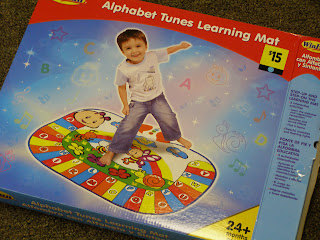
This is what the toy looks like out of the bag. if you look close up, I have painted raised lines around the colored letters and panels. I'm leaving it there on the floor over the weekend to dry. Knowing my "Toy Tester" he will probably try to peel all of it off the first time he tries to play with it if it doesn't feel right. My braille writer is on the blink so I can't stick braille letters and colors on the spots right now. We get leftover braille writers when we work with the multi-disabled kids. But that's a soap box for another time. Don't get me started!


This is a leap frog toy called "Fridge Farm Animal Magnets." I paid only $5 for it at a garage sale. It plays music and has a couple of sound effect puzzle games. One game involves matching the animal halves and another involves mixing them up to make silly combinations. I thought I'd braille the animal parts but my toy tester showed me I don't need it. He has already memorized what the pig feels like and loves to make a "pig-duck" to hear the silly song about a pig-duck.

I couldn't afford a big playground ball but Mr. Toy Tester has shown me that he likes this garage sale exercise ball. He can hear it when it bounces away because the bouncing sound from it echoes. It's tough enough for sitting on. Mr.Toy Tester likes to dribble this one, too. The only thing I don't like about it is it's color. I wish there was some way I could color it some bright fluorescent color. I had a student some years ago who could track a big orange playground ball against the green grass using some light perception.

This is an old poster I made maybe 10 years ago on fluorescent orange poster board to make my point to folks who had my low vision kids in their classes.

I have a toy tester at my home school where my little "office" is . After he has done his work he searches my shelves for toys. When he approves then it's good. You'll see him in a photo "toy testing." I used one where his face is not really clear so you won't go looking for him on Main Street. {:^D}
I found this learning mat in a Dollar General for only $15. Here's a photo of the box which shows how it's used. There are some adhesive rubber disks in the package but the directions don't say what they're for. Anyway the surface of the toy is smooth so I am trying some 3D paint on key areas for the blind.

This is what the toy looks like out of the bag. if you look close up, I have painted raised lines around the colored letters and panels. I'm leaving it there on the floor over the weekend to dry. Knowing my "Toy Tester" he will probably try to peel all of it off the first time he tries to play with it if it doesn't feel right. My braille writer is on the blink so I can't stick braille letters and colors on the spots right now. We get leftover braille writers when we work with the multi-disabled kids. But that's a soap box for another time. Don't get me started!

This is the 3D paint by the company that makes Elmer's glue.

This is a leap frog toy called "Fridge Farm Animal Magnets." I paid only $5 for it at a garage sale. It plays music and has a couple of sound effect puzzle games. One game involves matching the animal halves and another involves mixing them up to make silly combinations. I thought I'd braille the animal parts but my toy tester showed me I don't need it. He has already memorized what the pig feels like and loves to make a "pig-duck" to hear the silly song about a pig-duck.

I couldn't afford a big playground ball but Mr. Toy Tester has shown me that he likes this garage sale exercise ball. He can hear it when it bounces away because the bouncing sound from it echoes. It's tough enough for sitting on. Mr.Toy Tester likes to dribble this one, too. The only thing I don't like about it is it's color. I wish there was some way I could color it some bright fluorescent color. I had a student some years ago who could track a big orange playground ball against the green grass using some light perception.

This is an old poster I made maybe 10 years ago on fluorescent orange poster board to make my point to folks who had my low vision kids in their classes.

I made my own dry-erase board by gluing some bulletin board boarder around a ghost line poster. I laminated it and stuck it on a wooden bulletin board.

I had a toy phone that Toy Tester loved to borrow so I got this one for his birthday. I found it in Wal-Mart. It also plays music, has voices and teaches emergency numbers and home phone numbers. I stuck these braille numbers on it but they fell off in a day or so. He let me know they are not needed because he's already memorized where all the numbers and function buttons are located. He says he uses it to call girlfriends.


I had a toy phone that Toy Tester loved to borrow so I got this one for his birthday. I found it in Wal-Mart. It also plays music, has voices and teaches emergency numbers and home phone numbers. I stuck these braille numbers on it but they fell off in a day or so. He let me know they are not needed because he's already memorized where all the numbers and function buttons are located. He says he uses it to call girlfriends.

Subscribe to:
Posts (Atom)